Keep CarPlay. Lose The Cable. Connect Automatically.
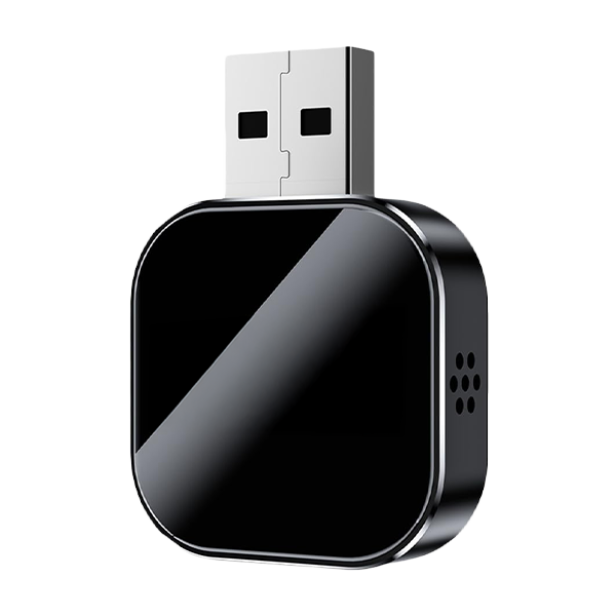
DrivePair is a compact wireless adapter designed to turn compatible factory wired CarPlay or Android Auto into a cable-free connection. Pair it once, then let your phone reconnect when you start the car.
- ✓ Works with compatible iPhone and Android systems
- ✓ Uses 5GHz Wi-Fi plus Bluetooth 5.0 for the wireless link
- ✓ Plug-and-play setup with no app or vehicle modification required
reconnection
advertised as supported
window
DrivePair makes the most sense if...
Your vehicle already has factory wired CarPlay or Android Auto and you want to stop plugging your phone in on every drive.
You use wired CarPlay every day
You want the same familiar interface without reaching for a cable every time you get in.
You use wired Android Auto
DrivePair is advertised as a 2-in-1 adapter for compatible iPhone and Android systems.
You commute often
Automatic reconnection can remove one small repeated step from every trip.
You want a cleaner console
Keep the phone off the cable and reduce the wire hanging from the dashboard or center console.
You want to keep factory controls
The seller states steering-wheel buttons, touchscreen functions and voice controls remain available.
You do not want an installation project
No dashboard removal, dealer visit or permanent vehicle modification is required.
From cable routine to automatic connection
The appeal is simple: keep the infotainment system you already use, but remove the daily cable step.
✘ Traditional wired routine
- ✘ Find and connect the cable when you get in
- ✘ Cable stays visible around the console
- ✘ Reconnect again after short stops
- ✘ Worn or loose cables can become annoying over time
- ✘ USB port stays occupied by the phone connection
✓ With DrivePair
- ✔ Pair once, then reconnect automatically on future drives
- ✔ CarPlay or Android Auto stays available wirelessly
- ✔ Compact adapter can stay tucked near the USB port
- ✔ Continue using supported factory controls
- ✔ Use a separate wireless charger if your vehicle has one
DrivePair does not add CarPlay or Android Auto to a vehicle that never had it. Your car must already support a compatible wired system.
Built around a simpler wireless driving routine
The product focuses on compatibility, quick reconnection and keeping your existing in-car controls familiar.
Automatic reconnection
After the initial pairing, the adapter is designed to reconnect when you start the vehicle.
CarPlay support
Designed to convert compatible factory wired Apple CarPlay into a wireless connection.
Android Auto support
The same adapter is also advertised for compatible factory wired Android Auto systems.
5GHz Wi-Fi + Bluetooth 5.0
The wireless link uses the two technologies together to support responsive in-car connectivity.
Retains vehicle controls
Keep compatible touchscreen, steering-wheel controls, knobs and voice assistant access.
USB-A and USB-C flexibility
A USB-C adapter is included for vehicles that use the newer port format.
Compact design
The small adapter is easy to leave connected without taking over the center console.
No app required
Setup is handled through the vehicle and phone pairing process rather than a separate companion app.
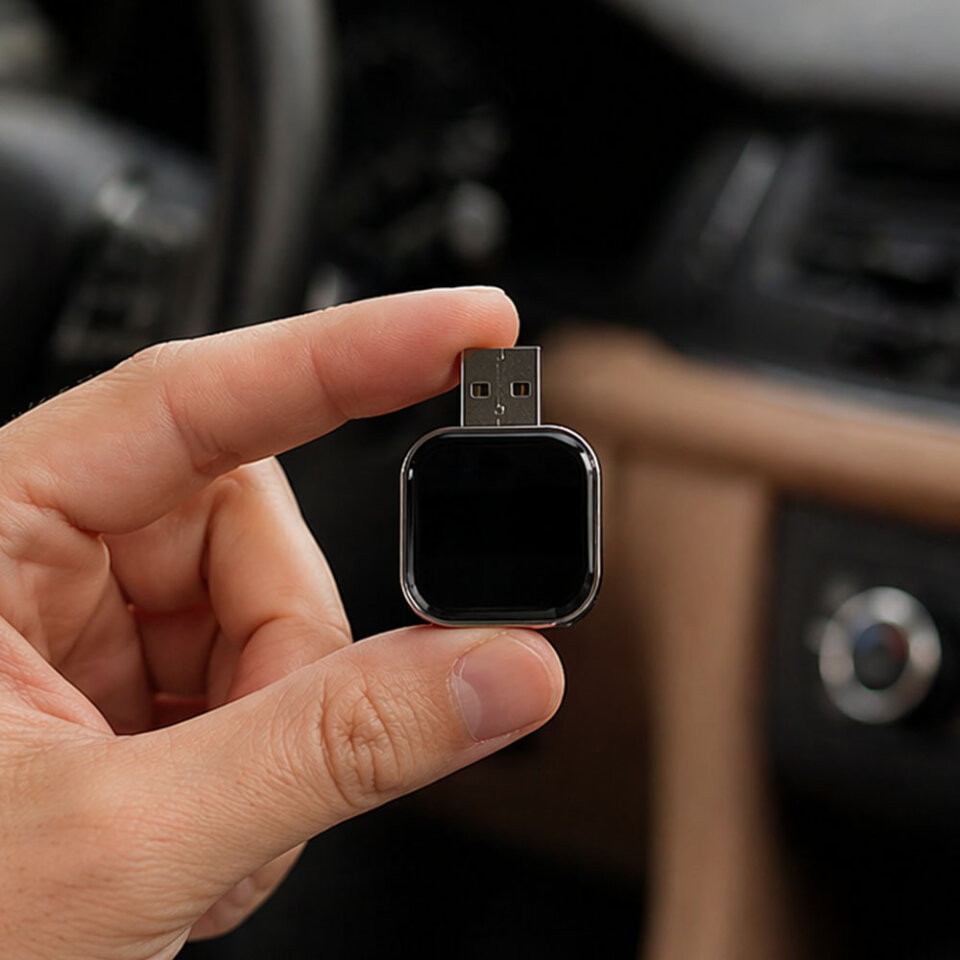
A small adapter that changes the way you connect every day
DrivePair does not replace your vehicle's infotainment system. It works with a compatible wired CarPlay or Android Auto setup and moves the phone-to-car connection from cable to wireless.
- ✔Pair once: complete the first connection through the vehicle display and your phone.
- ✔Leave it connected: the adapter can remain in the vehicle's USB port.
- ✔Start and go: future connections are designed to happen automatically.
- ✔Keep your interface: maps, music, calls and supported vehicle controls stay within CarPlay or Android Auto.
Wireless in three simple steps
The first pairing is a one-time setup. After that, DrivePair is designed to reconnect automatically on future drives.
Plug it into the car
Connect DrivePair to the vehicle's CarPlay or Android Auto USB port. Use the included USB-C adapter if your car requires it.
Pair your phone once
Follow the connection prompts on your vehicle display and phone. The seller describes initial pairing as a short setup process.
Drive wirelessly
Leave the adapter connected. On later trips, it is designed to reconnect automatically after the vehicle starts.
The one thing to confirm before ordering
DrivePair is a wireless conversion adapter. It does not install CarPlay or Android Auto in a vehicle that lacks those systems. The car should already work with CarPlay or Android Auto through a wired USB connection.
How the DrivePair setup compares
A practical look at the daily experience. Features of third-party adapters vary by model.
| Feature | DrivePair | Standard Wired Setup | Other Wireless Adapters |
|---|---|---|---|
| CarPlay + Android Auto support | ✔ Both advertised | ✔ If supported by vehicle | Varies by model |
| Automatic phone reconnection | ✔ Designed for auto-connect | ✘ Cable connection required | Varies by model |
| 5GHz Wi-Fi + Bluetooth 5.0 | ✔ Yes | N/A | Varies by model |
| USB-C adapter included | ✔ Yes | Depends on your cable | Varies by package |
| Retains supported factory controls | ✔ Yes | ✔ Yes | Varies by model |
| No daily phone cable | ✔ Yes | ✘ No | ✔ Usually |
| Permanent vehicle modification | ✔ None required | ✔ None required | Usually none |
Third-party wireless adapter specifications are not standardized. Always compare the exact product you are considering.
Want To Cut The Cable On Your Next Drive?
Check current DrivePair availability, package options and the live promotional price.
What published DrivePair customers report
The comments below are condensed from customer feedback displayed by the seller. Individual experiences can vary.
Finally working well with Android
After trying other adapters, this customer said DrivePair worked with a Samsung phone and connected automatically when the car started.
Faster than the previous adapter
This reviewer highlighted quick map loading, normal music playback and a smoother connection compared with an older wireless adapter.
Easy fit in a newer truck
A customer using a newer F-150 reported plugging the adapter into USB-C, tucking it into the console and then leaving the cable behind.
Stayed connected on a long trip
This customer described using maps and music through a long road trip without needing to reconnect the phone at every stop.
A small convenience that adds up
One reviewer said that after years of plugging in a phone every day, automatic wireless connection made the driving routine feel noticeably easier.
Simple enough to set up for family
This reviewer described setting it up for family members in only a few minutes, after which the adapter connected automatically.
Cleaner-looking center console
A customer who disliked the visible dashboard cable liked being able to keep the phone on a wireless charger while the adapter handled connectivity.
Useful for a daily commute
Another customer described the convenience of getting into the car for a regular commute without plugging and unplugging the phone twice a day.
USB-C adapter solved the port issue
A buyer reported using the included USB-C adapter in a newer vehicle and said the connection worked on the first setup attempt.
Customer feedback is displayed by the seller and is not independently verified by this site. Names and experiences are presented as published or summarized from the seller's review section.
Try DrivePair with the seller's 30-day refund window
The seller states that eligible products may be returned within 30 days of receiving the order. Returns require prior approval and an RMA, and the exact conditions depend on the reason for the return.
Check The Current OfferFor a change-of-mind return, the seller states the item must be unused, undamaged and in original packaging. Return shipping and original shipping charges may not be refundable. Review the official terms before ordering.
Still have questions?
Compatibility & Product
Will DrivePair work with my car?
DrivePair is designed for vehicles that already have factory wired Apple CarPlay or Android Auto. If your phone currently launches one of those systems when connected by USB, the adapter is intended to convert that connection to wireless. The seller advertises compatibility with more than 600 vehicle models.
Does it work with both iPhone and Android?
According to the seller, yes. DrivePair is a 2-in-1 adapter designed for compatible Apple CarPlay and Android Auto systems.
How fast does it reconnect?
The seller states that automatic reconnection typically takes around 5 to 10 seconds after the vehicle starts. Actual timing can vary by phone and vehicle.
Do I need to install an app?
No separate app is advertised as necessary. Plug the adapter into the correct vehicle USB port, complete the initial pairing process and leave the adapter connected.
What if my car only has USB-C?
The seller states that a USB-C adapter is included, allowing the product to be used with compatible vehicles that use USB-C instead of a standard USB-A port.
Will my steering-wheel buttons and touchscreen still work?
The seller states that compatible factory controls such as steering-wheel buttons, touchscreen functions, knobs and supported voice assistants continue to operate through CarPlay or Android Auto.
Does DrivePair add CarPlay to an older car that does not have it?
No. This is a wireless conversion adapter, not a CarPlay or Android Auto retrofit system. Your vehicle needs an existing compatible wired CarPlay or Android Auto setup.
Can I keep the adapter plugged in?
Yes. The product is designed to remain connected to the vehicle USB port so it can reconnect when you start the car.
Orders, Shipping & Refunds
What is the refund policy?
The seller offers a 30-day return window from the date you receive the order, subject to its return conditions. You must contact support for approval and an RMA before sending a product back.
How quickly are orders processed?
The seller says orders are typically processed within 24 hours, although promotions, holidays and other busy periods can extend processing time.
How do I track an order?
After dispatch, the seller sends tracking information by email. The tracking number may take 24 to 72 hours to begin showing carrier updates.
Ready To Make CarPlay Or Android Auto Wireless?
Pair once, keep your familiar vehicle interface and stop reaching for the phone cable on every drive. Confirm compatibility before ordering.
Check DrivePair AvailabilityPrivacy Policy
About this page
This website is an independent advertising and review page. It does not process DrivePair orders or store full payment card information.
Information this page may collect
Standard website technologies may collect information such as IP address, browser type, device information, referring pages and interaction data. Cookies or similar technologies may also be used for site functionality, analytics and affiliate attribution.
When you click an offer link
You are redirected to a third-party seller or checkout environment. Any information you submit there is governed by that seller's own privacy policy and terms.
Affiliate tracking
Offer links may contain tracking parameters that allow the advertising partner to attribute a purchase or visit to this page.
Your choices
You can restrict or delete cookies through your browser settings. Disabling some technologies may affect attribution or certain website functions.
Product-order privacy
For privacy requests relating to an actual DrivePair order, use the official seller's support resources because this independent page does not control seller-side order records.
Terms & Conditions
Independent advertising page
This page provides advertising and informational content about DrivePair. We are not Evora LLC and do not sell, ship or process payment for the product.
Seller and purchase terms
The official DrivePair terms identify Evora LLC as the brand operator and seller. When you proceed to the seller's website, your purchase is governed by the seller's current terms, policies and checkout disclosures.
Product compatibility
You are responsible for confirming that your vehicle, phone and wired CarPlay or Android Auto system meet the product's compatibility requirements before ordering.
Pricing and availability
Promotions, discounts, stock, package options, taxes and shipping costs can change. The final terms shown on the seller's checkout page control your purchase.
Advertising disclaimer
This page may receive compensation from purchases generated through its links. Customer experiences may vary and do not guarantee identical results for every vehicle, phone or user.
Shipping & Returns
Order processing
The seller currently states that orders are typically processed within 24 hours. Processing may take longer during promotions, holidays or product launches.
Estimated United States delivery
The seller currently lists approximately 2 to 12 days after dispatch for United States deliveries. Delivery estimates are not guarantees and may be affected by carrier or customs delays.
Shipping cost
The official shipping policy states that shipping and handling fees start from $4.95 and vary by destination and shipping method. The exact amount is shown at checkout.
30-day return window
The seller states that eligible products may be returned within 30 days of receipt. Returns must be approved before shipment and require a Return Merchandise Authorization, or RMA.
Change-of-mind returns
For change-of-mind returns, the seller requires the item to be unused, undamaged and in original packaging with included accessories. Customers are responsible for return shipping, and original shipping charges are non-refundable.
Damaged or defective products
The seller asks customers to contact support with order information and photos when a product arrives damaged or defective. Approved returns are handled according to the seller's current return policy.
Contact
Order and product support
For DrivePair orders, billing, delivery, returns or technical product questions, contact the official seller directly.
Official seller information
- Brand operator: Evora LLC
- Phone: +1 (608) 557-8407
- Registered address: 9110 Selborne Lane Suite 220, Office P, Chattahoochee Hills, Georgia 30268
- Website: Official DrivePair Contact Page
Returns
Do not send a return to the registered business address. The seller requires prior approval and provides the correct return address with the RMA instructions.